Adopt
document management software
With digital transformation accelerating across every industry, adopting document management software has become essential for organizations of all sizes. But what exactly is document management software?
A document management system (DMS) is designed to organize, store, manage and share documents and information across an organization.
Many digital transformation agencies support businesses in selecting the right document management solution to improve organization, save time and increase productivity.
Today, document storage and file sharing have become indispensable for businesses of every size, from startups and SMEs to large enterprises, associations and public organizations. Every year, millions of documents are exchanged between companies and their customers, suppliers and employees.
As organizations continue to digitize their processes, the need for an efficient document management solution becomes increasingly important. Businesses need to preserve their documents over time, access them whenever needed, share them securely and retrieve them quickly using a powerful search engine.
Implementing a document management system also delivers a rapid return on investment. By reducing or even eliminating manual document workflows, organizations lower processing costs, minimize errors and reduce the risk of lost information.

What are the main functions of document management software?
Digitization
The days of overflowing filing cabinets and paper documents covering every desk are over. Businesses are increasingly digitizing their paper documents to save space and simplify access to information.
Invoices, delivery notes, contracts and administrative documents can all be stored digitally and accessed in just a few clicks.
Centralization
A document management system centralizes all your documents in one secure location. It becomes the single repository for your company’s information and knowledge.
It can store virtually any type of document, including:
- scanned documents
- email attachments
- Word documents
- plans and drawings
- images
- videos
- technical documentation
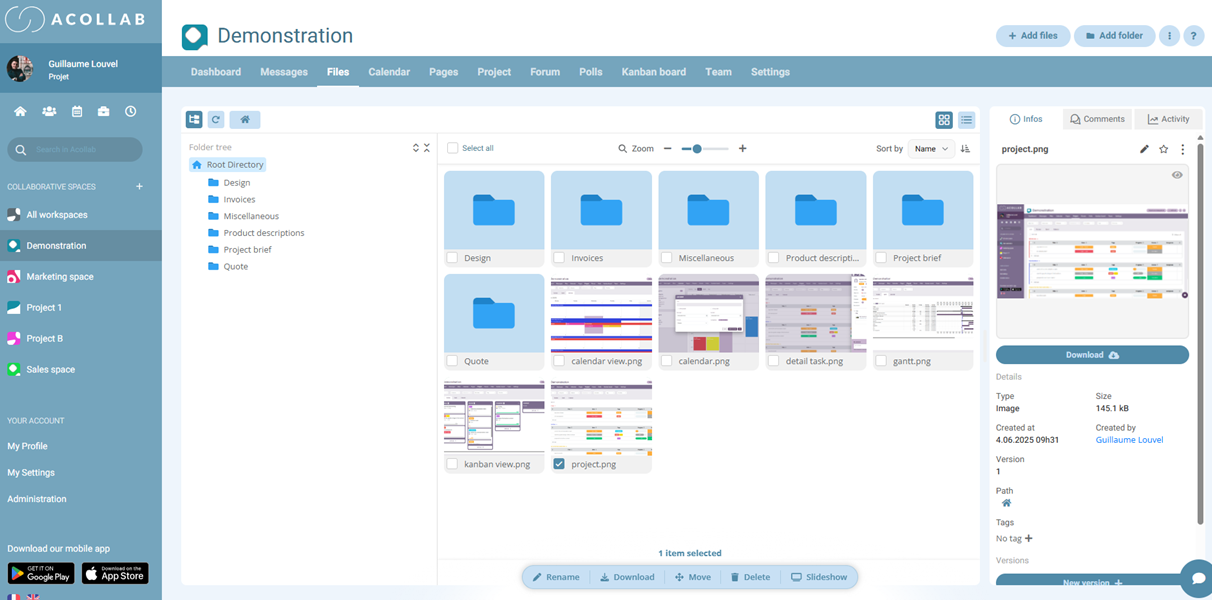
For example, a project manager can centralize every document related to a project in a single folder, including specifications, quotations, graphic guidelines and meeting minutes.
By replacing paper-based document circulation with a centralized digital repository, organizations significantly reduce the risk of losing information and make documents much easier to find. Many document management solutions also include version control, allowing users to keep a complete history of document revisions.

Organization
A document management system helps you build a logical and efficient document structure.
Once your documents have been centralized, you can organize them according to the way your business operates: by department, project, customer or document type.
This structured organization makes information easier to find for employees, customers and partners alike.
Most document management solutions also include a search bar to help users quickly locate documents within the folder structure. Many also support keyword searches using tags, making information retrieval even faster.
Sharing
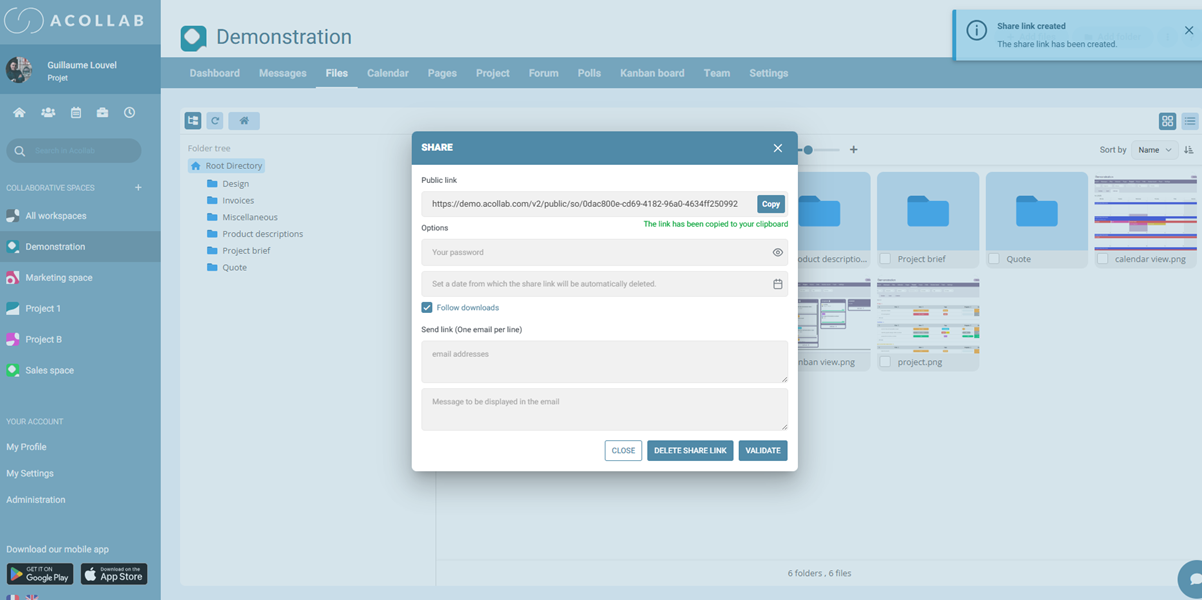
A document management system allows you to share your files in real time, with just a few clicks, with your clients, partners or colleagues.
On the one hand, you can share your documents with your workspace members (employees, clients, service providers, etc.) through a dedicated collaborative space. Users can easily access any document you have shared with them. In today’s increasingly collaborative work environment, working together on documents is not always easy. A document management system simplifies collaboration between multiple stakeholders, who often work remotely.
On the other hand, you can also share documents on a one-off basis with invited users. These users will only be able to view the files you have shared with them, without accessing the rest of the project’s folders. They will not be able to edit documents or create additional shares.
Depending on the software you choose, you can assign specific permissions for each folder, workspace or individual file. In short, a document management system helps you manage the entire lifecycle of your documents, from creation and modification to archiving and sharing.
Remote access
Whether your employees are working remotely, travelling, or whether your clients or accountant need access to your documents, a document management system makes information available wherever they are.
With a simple username and password, users can securely access their workspace and the documents they are authorized to view, from any location. By providing secure remote access, document management software also supports flexible and hybrid working.
Permission management
Administrators control who can access folders and files stored within the document management system.
Users can be assigned different roles depending on whether they are employees, clients or external partners, ensuring that everyone only has access to the information relevant to them.
What are the benefits of document management software?
Implementing a document management system offers numerous benefits for organizations of all sizes.
Encourage document sharing
A document management system makes it much easier to share information across your organization.
Instead of printing multiple copies of the same document for different team members, information can be shared instantly with everyone who needs it. Communication becomes more efficient, both internally and with external stakeholders.
Simplify day-to-day work
Centralizing all your documents in one place makes everyday work easier for both you and your colleagues.
When a new team member joins a project, they immediately have access to the project’s documents, history and discussions, making onboarding much faster and more efficient.
Save time
Searching for information is one of the biggest sources of lost productivity in many organizations.
A document management system eliminates this time-consuming task by allowing users to quickly locate any document through a well-organized folder structure and powerful search tools.
Whether you’re looking for a specification sent by a client or a technical document shared several months ago, you can find it in just a few seconds.
Everyday actions, uploading a document, moving a file to another folder or sharing information with a client, can also be completed in just a few clicks.

Improve productivity
A document management system allows your teams to focus on what matters most.
Instead of wasting time searching for files or managing multiple versions of the same document, employees can dedicate more time to higher-value tasks. Organizations also benefit from lower paper consumption, streamlined processes and improved overall efficiency.
Improve your company's image
By centralizing documents and making information easier to access, your organization becomes more responsive to clients and partners.
Documents are easier to find, requests are handled more quickly, and collaboration becomes smoother, helping you deliver a more professional customer experience.
Secure your data
A document management system helps reduce the risk of data loss and unauthorized access.
Most solutions include advanced permission management, allowing administrators to control who can view, edit or share documents. When choosing a document management solution, it is also important to consider data security and where your data is hosted.
How to choose document management software?

Before selecting a document management system, it’s important to assess your organization’s needs.
Ask yourself the following questions:
- Do you simply need to store your documents?
- Do you want to share documents with external users?
- Where should your data be hosted?
- Are you looking for a ready-to-use solution?
- Can the software be easily integrated into your existing IT environment?
The answers to these questions will help you identify the solution that best fits your organization.
Once you’ve selected your software, you can define your document structure as a team:
- Which folders and categories should you create?
- Who should have access to each project or folder?
- Who will manage the platform as administrators?
Finally, choose software that is easy to use.
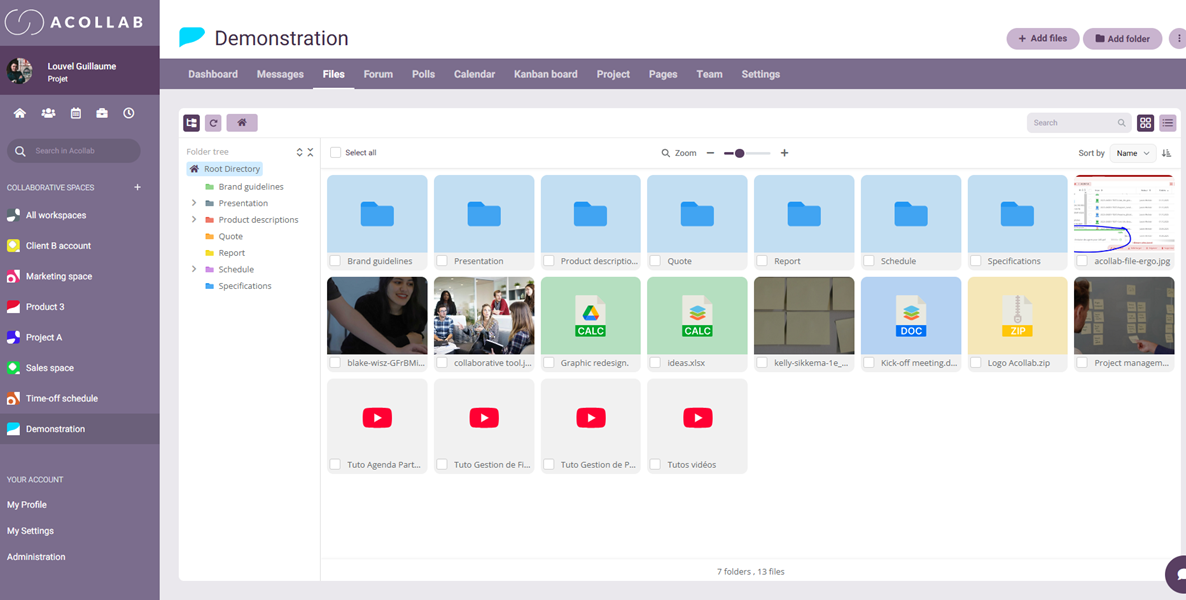
Some document management systems require complex implementation or advanced technical knowledge, while others are intuitive and can be deployed quickly. An easy-to-use solution encourages user adoption and minimizes the need for extensive training.
Choose a solution that is intuitive, user-friendly, secure and efficient enough to manage all types of documents, including images, quotations, contracts, PDF files and technical documentation.
Some document management solutions focus exclusively on document storage, while others are integrated into a complete collaborative platform offering additional tools such as project management, communication and team collaboration. The right choice ultimately depends on your organization’s needs.
What is Acollab?
Acollab is a collaborative platform that includes an intuitive and easy-to-use document management system. All data is securely hosted in France.
It provides all the benefits described above while offering the features organizations need to efficiently manage their documents. Here are some of its key features :
Secure document storage
Acollab allows you to securely store your documents online.
You can organize your files using a logical folder structure, making them easier to browse and access. This reduces unnecessary email exchanges when reviewing or approving documents.
Security is ensured through advanced permission management, allowing administrators to assign access rights by folder or workspace. Depending on their permissions, users can view, download or delete documents.
All data is securely hosted in France.
Version management

Acollab automatically manages document versions, making it easy to track every modification.
Users can access the complete version history and restore previous versions whenever necessary. To prevent unwanted changes, documents can also be locked before editing.
This ensures complete traceability throughout the document lifecycle.
Comments and tags
Acollab allows users to add comments to documents, making it easier for teams to collaborate and exchange feedback directly within the platform.
You can also use tags to organize your documents and make them easier to find.
Create shared documents and spreadsheets
Acollab also lets you create shared text documents and spreadsheets that multiple users can edit simultaneously.
Your team can work together in real time on the same document, making it particularly useful for meeting minutes, project documentation or collaborative reports.
Document search

Acollab includes a powerful search engine that helps you quickly find any document.
You can search by document title, document content or even by the comments associated with a file.
The platform also offers different viewing modes, including a list view and a thumbnail view for images, making it easier to browse your documents.
File sharing
Share your files, images and PDF documents with clients or partners, even if they don’t have an Acollab account.
Documents can be shared quickly, securely and effortlessly.
To enhance security, you can protect shared folders with a password and define an expiration date for each sharing link.
For example, if you want a client to access a document for only seven days, simply set the link to expire after that period. Once it expires, the document will no longer be accessible.
These sharing features improve responsiveness and make collaboration with clients and external partners much easier.
Notification system

Acollab keeps you informed of every important action. Receive notifications whenever a document is added, a comment is posted or other activities take place within your collaborative workspace.
This helps you stay up to date with your projects and improve your team’s productivity. Acollab is designed to simplify collaboration and improve the way teams organize their work. It provides faster access to information while ensuring complete traceability through a single centralized platform.
In addition to its document management system, Acollab also includes other collaborative tools developed by Akelio, such as project management, time and expense tracking, and a shared calendar. The platform also offers communication tools including chat, messaging, forums and polls, along with a comprehensive notification system that keeps users informed of every important update.
If you’d like to discuss your document management needs, feel free to contact us or schedule a free demonstration.
Best practices
To get the most out of your document management system, start by defining a clear document organization that is shared across your entire team.
Setting up a logical folder structure, consistent naming conventions and appropriate access permissions helps prevent duplicate files and version conflicts.
It is also recommended to progressively centralize all your documents within the document management system instead of keeping files scattered across multiple storage solutions.
To encourage user adoption, train your teams on everyday best practices and ensure documents are updated regularly.
Finally, review your document management processes and user permissions periodically to maintain a high level of security, compliance and efficiency.
When integrated into a collaborative platform like Acollab, a document management system becomes a central pillar of teamwork and information management.