Document management
software (EDM)
Acollab document management software
Acollab’s document management software (EDM) provides comprehensive digital document management for businesses and organizations.
The Acollab software works as a secure electronic storage space, making your files accessible online to some or all of your employees and collaborators. Different types and formats of documents can be stored and shared online, including:
- Office documents (Word, Excel, PowerPoint, etc.)
- Electronic documents (PDF, TIFF, etc.)
- Images
- Videos
Managing document flows has become essential for businesses. Effective document management brings greater consistency and organization to teams. Access to information can be structured through detailed access rights, helping businesses improve efficiency and internal organization.
Document management software also makes it easier to find files and reduces the risk of losing important documents.
Acollab's EDM software's features
File sharing software
The primary function of Acollab’s document management software is online file sharing. It allows you to exchange digital documents efficiently and in an organized way.
More than just a file-sharing platform, Acollab allows you to structure and reorganize your document folders according to your needs. Your files can be accessed wherever you are.
No more files getting lost between different stakeholders or documents that are difficult to find. With Acollab, file sharing between your teams, clients and partners is simple and centralized in one place.
Information can be shared securely, with access rights tailored to each project and each user.
Online document editing
Online document editing allows teams to work together on the same document. Several people can write, edit and enrich a document simultaneously and in real time.
With Acollab, you can create shared text documents as well as shared spreadsheets.
Online document editing makes teamwork easier and helps streamline your processes.
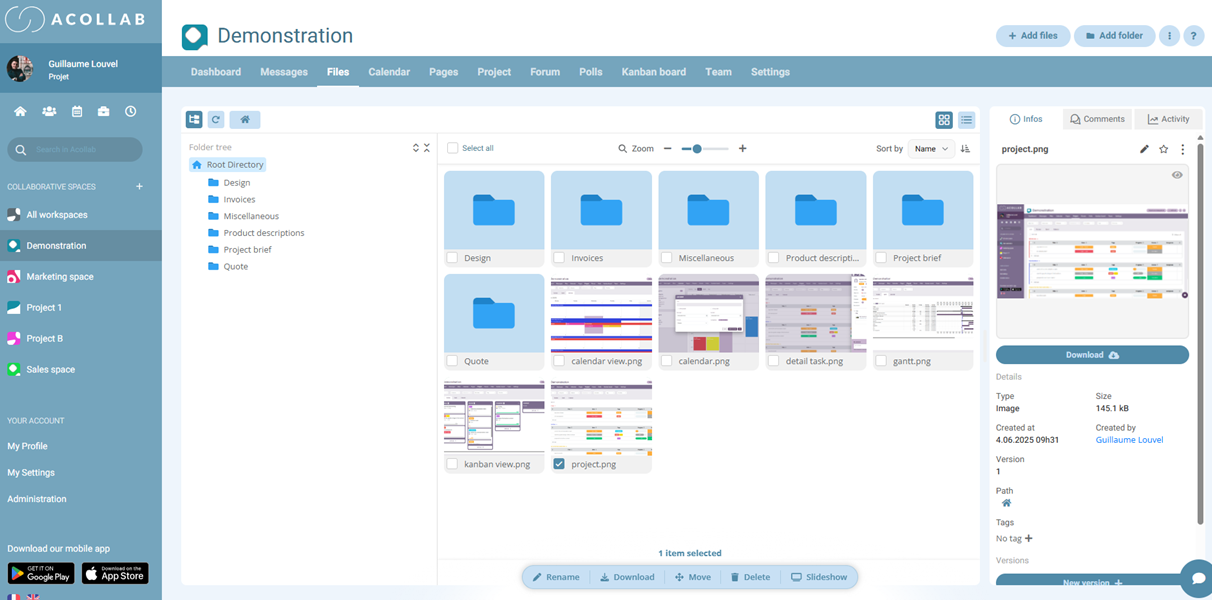
Control access to every file and folder
Acollab allows you to organize your documents according to your needs.
You can determine which users and stakeholders have access to specific folders within a project. Each user can therefore access the documents they need while keeping other information restricted.
Centralizing information in this way helps teams work more efficiently on a daily basis.
Create file and folder sharing links for your partners
Every file or folder stored in Acollab can be shared with external contacts such as partners and clients.
Simply create a unique sharing link, which can optionally be protected with a password.
This feature allows you to securely exchange files with people who are not part of your collaborative workspace. Your business can therefore work more efficiently and respond more quickly to clients and partners.

Automatic version management
Depending on your business processes, you may need to keep track of different versions of the same document.
Acollab automatically manages your file versions. If you upload a document with a filename that already exists, a new version is automatically created while the previous version remains accessible.
You can easily view or restore an earlier version whenever needed.
Frequently asked questions
What is an EDM?
An EDM (Electronic Document Management) system is software used to store, organize, share and retrieve all the documents of a business or organization.

Is an EDM secure?
Yes. Acollab provides several features designed to secure your documents and control access, including:
- Access rights
- Secure sharing links
- Action tracking
Acollab’s data is hosted in France
Can teams collaborate on documents?
Yes. Acollab allows teams to collaborate on documents through:
- Real-time editing of text documents and spreadsheets
- Comments on files
- Automatic version management
Is Acollab suitable for small businesses and SMEs?
Yes. Small businesses and SMEs can particularly benefit from document management software to:
- Reduce disorganization
- Save time
- Improve document management
- Centralize information

The main benefits of Acollab document management software
Acollab’s document management software addresses the needs of businesses looking to digitize their documents while improving organization and information management.
Using Acollab’s online document management software allows you to:
- Process documents faster: information can be stored and organized quickly, while folders and documents can be accessed in just a few clicks.
- Increase productivity: teams can collaborate on documents and access the information they need more easily.
- Manage document flows more effectively: centralize your files and control how information is shared.
- Structure folders and processes: provide all project stakeholders with a common folder structure.

- Share information more efficiently: make important information available to the right people at the right time.
- Adapt document classification to your organization: create a document structure suited to your business and processes.
- Reduce your reliance on paper documents: digitize and centralize your files to reduce physical storage requirements.
- Archive documents: keep your historical documents accessible when needed.
- Reduce costs: limit printing, paper and physical storage requirements.
- Improve document security: control access to files and secure your documents and folders.
- Access your information from anywhere: retrieve your documents whether you are working remotely, travelling or in the office.