
All about the document manager
In a world where digital information is becoming increasingly abundant, the role of the document manager is essential. Whether you’re an individual looking to organize your documents or a company seeking to optimize data management, understanding what a document manager is, how it works, and what features it offers is crucial.
What is a document manager?
A document manager is software that allows you to navigate, organize, view, edit, and manage documents and folders stored on a computer, server, or online storage system.
In other words, it’s the interface between the user and the document system.
Documents managers have become essential for efficiently handling the growing volume of digital data. They not only allow users to store documents but also to quickly find, categorize, share, and secure access to them.
The main functions of a document manager
A good document manager offers a range of features that enable optimized data management:
Navigation and exploration
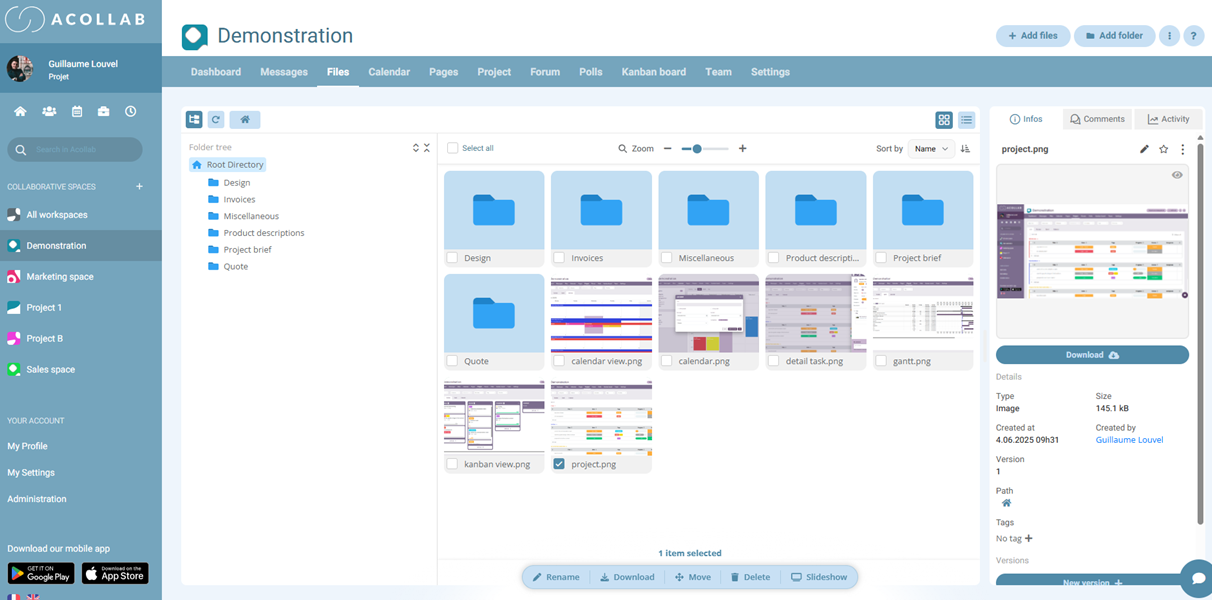
The document manager allows you to navigate through folders and subfolders to access stored documents. It often offers multiple viewing modes such as list, icons, details, or tree structure.
Document organization
Users can create folders and subfolders, rename files, and move or copy them as needed. A well-structured organization significantly reduces the time spent searching for documents.
Search and filtering
Modern document managers include advanced search features. You can search by file name, type, creation or modification date, and in some cases, even within the document contents.
Rights and security management
In professional environments, security is paramount. A document manager can allow you to define who can view, edit, or share a document. Some also offer file encryption.

Quick preview and editing
Some document managers allow you to quickly preview a file without opening it in its dedicated application. This is especially useful for images or PDFs.
The different types of document managers
There are several types of document managers, depending on their use and platform:
Built-in operating system document managers
Modern operating systems come with built-in file managers:
- Windows: File Explorer. It allows you to navigate files, create folders, search, and copy/paste documents.
- MacOS: Finder, which offers an intuitive interface with advanced search and sorting features.
- Linux: Nautilus, Dolphin, Thunar, etc. Each distribution provides its own file manager with specific features tailored to the user.
Third-party document managers
These programs often offer more features than built-in file managers.
Examples:
- Total Commander: powerful and customizable, with advanced search and comparison functions.
- Directory Opus: very comprehensive, ideal for professionals handling large volumes of documents.
- XYplorer: clear interface with advanced search and management options.
Online document managers
These tools allow you to manage documents stored online and facilitate collaboration:
- Google Drive: cloud file manager with automatic synchronization and easy sharing.
- Dropbox: secure cloud storage with document versioning.
- Acollab: comprehensive online document manager, French-based, designed for small and medium-sized businesses (SMBs).
Why use a document manager?
Using a document manager offers numerous benefits, whether for an individual or a business:
Time saving
Searching for and organizing documents is simplified, allowing you to save valuable time.
Error reduction
By having a clear structure and properly named files, you can avoid mistakes such as losing documents or working on an outdated version.
Enhanced security
Document managers help protect sensitive data, notably through permissions.

Facilitated collaboration
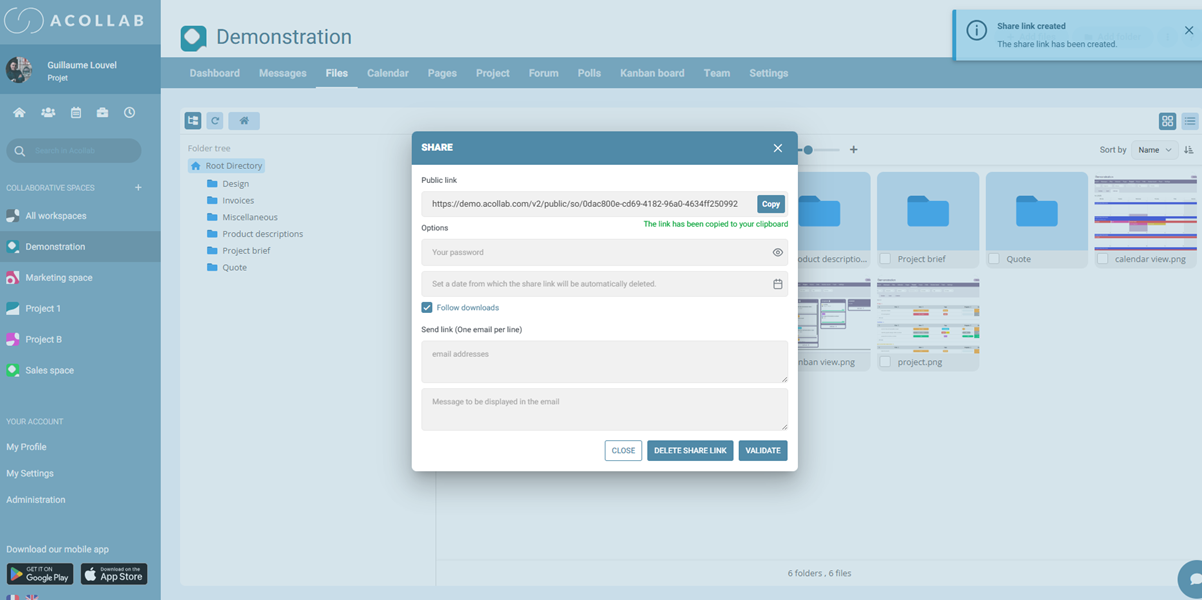
Document sharing allows teams to work together, even remotely, without creating duplicates—especially with online document management system like Acollab.
Improved productivity
Good document organization contributes to a smoother and less stressful work environment.
How to choose the right document manager?
The choice depends on your needs, environment, and preferences:
Personal or professional use
For personal use, a built-in manager like Windows Explorer or Finder is often sufficient. For professional use, an advanced or online tool such as Acollab may be necessary.
Number of documents and data volume
If you manage a large number of documents, opt for a manager that offers advanced search, sorting, and filtering features.

Collaboration and remote work
For remote teams, an online manager with secure sharing is essential.
Security
For sensitive documents, it’s important to choose a manager that offers encryption and access control options.
Interface and ergonomics
Ease of use is a key factor. An intuitive interface helps save time and prevent mistakes.
Best practices for managing your documents effectively
Even with a good document manager, it’s important to follow certain practices to stay organized:

Give documents clear and descriptive names
Use clear, descriptive names, optionally including the date.
Organize folders logically
Create folders by project, client, or document type to make navigation easier.
Regularly archive documents
Move outdated files to archives to keep only the essentials within easy reach.
Back up documents regularly
Make sure your important documents are backed up both locally and in the cloud.
Clean up regularly
Delete unnecessary documents to maintain a clear workspace.
Document manager and productivity: the winning duo

A team’s efficiency often depends on the quality of its digital organization. A good document management software allows you to:
- Reduce stress related to lost information.
- Save time searching for documents.
- Facilitate collaboration and communication.
- Maintain a structured and secure digital environment.
In other words, investing in the right document manager is investing in productivity and peace of mind.
Conclusion
The document manager is much more than just a navigation tool. It is a true ally for organizing, securing, and sharing your data. Whether for personal or professional use, it simplifies digital life and enhances daily efficiency.
By following best practices and choosing the document manager that suits your needs, you can transform the way you work and fully harness the potential of your data.