
Team workload management
A project’s success depends not only on careful planning but also on balancing workloads across team members. However, when an organization manages multiple projects simultaneously, it quickly becomes difficult to know who is available, who is already heavily involved, and where additional resources may be needed.
To address this challenge, Acollab has enhanced its Project Management module with a brand-new Resource Management feature. This new functionality gives you a clear overview of your team’s workload, both within individual projects and across your entire project portfolio.

Gain better visibility into your project resources
In many organizations, project managers and team leaders oversee several projects at the same time.
Without the right tools, answering essential questions becomes difficult:
- Who is already working on multiple projects?
- Which team members still have available capacity?
- Are certain teams overloaded?
- How can new tasks be distributed more evenly?
The new Resource Management feature has been designed to provide a simple, visual answer to these everyday challenges.

View resources within each project
The first improvement is a dedicated resource view for every project.
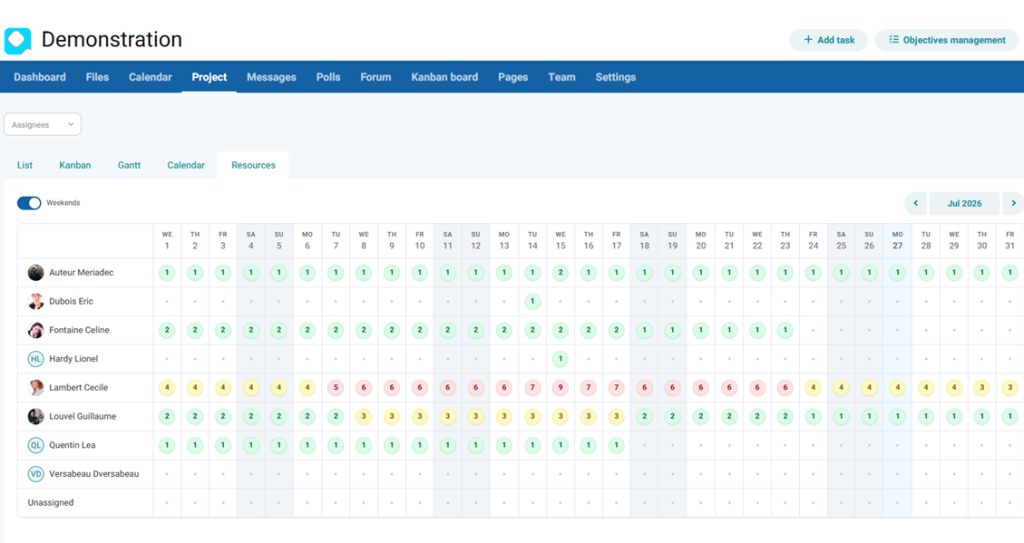
You can now see the number of tasks assigned to each team member directly within the project. This provides an instant snapshot of how work is distributed across your team.
In just a few seconds, you can identify:
- Team members with the heaviest workloads
- Available resources
- Potential workload imbalances
This visibility makes it easier to allocate work fairly and adjust project organization when needed.
Get a global overview across all your projects
In addition to project-specific views, Acollab now provides a consolidated overview of workloads across your entire workspace.
This global view is particularly valuable for project managers, department heads, and team leaders who supervise multiple projects simultaneously.
It displays the total number of tasks assigned to each user across all projects.
This makes it easy to identify:
- Highly engaged team members
- Potential workload bottlenecks
- Imbalances between teams
- Available resources for upcoming projects
Color-coded indicators for instant workload monitoring
To make workload analysis even more intuitive, Acollab includes visual workload indicators based on color coding.
Each user is automatically assigned a workload status:
- Green: Normal workload
- Orange: 3 or more assigned tasks
- Red: 5 or more assigned tasks
Thanks to this immediate visual overview, it becomes easier to estimate projects accurately, anticipate workload peaks, and rebalance assignments before they impact project progress.
Filter resources by team or department
Organizations structured into departments or business units often need to analyze workloads at a broader level.
That’s why the consolidated view also lets you filter resources by user groups.
For example:
- Marketing
- Sales
- Communications
- Engineering
- Urban Planning Committee
With just a few clicks, you can gain a detailed overview of the workload for a specific department or team.
This makes project planning and resource allocation across the organization much easier.
Improve day-to-day project management
Resource Management is much more than a reporting tool.
It helps project managers and team leaders make better decisions by providing real-time visibility into team workloads.
With these insights, you can:
- Distribute tasks more fairly
- Prevent employee overload
- Anticipate future resource needs
- Improve project organization
- Strengthen collaboration across teams
Fully integrated into your Acollab workspace
Like all Acollab features, Resource Management is fully integrated into your collaborative workspace.
Everything is centralized within a single platform, including:
- Project management tool
- Task management
- Document management
- Team communication
- Shared calendars
- And now, resource management
Our goal remains the same: to provide complete visibility into your organization’s activity so your teams can collaborate more efficiently.