
Acollab news: Subtasks to better
organize your projects
Managing a project is about more than simply creating a to-do list and ticking off tasks as you go. Some assignments involve several steps, require input from multiple team members, or need to be completed in a specific order.
To meet these needs, Acollab is expanding its project management module with a new feature: subtasks.
You can now break down a main task into several more specific actions. This makes it easier for teams to structure their work, share responsibilities and track project progress.
Why use subtasks in a project?
In a project, a task can quickly become too broad. Creating a single task such as “Prepare the website launch” provides only a limited overview of the work involved. Breaking it down into subtasks, on the other hand, allows you to identify each step of the project in greater detail.
Everyone knows exactly what they need to do, while the project manager retains an overview of the overall assignment.
That is the main benefit of subtasks: adding detail without losing sight of the bigger picture.

What is a subtask?
A subtask is an action linked to a main task. It allows you to break down a complex task into smaller, easier-to-manage steps.
The main task represents the overall objective, while subtasks outline the individual actions required to achieve it.
For example:
Main task: Organize an event
Subtasks:
- Book the venue
- Contact the speakers
- Prepare the invitations
- Promote the event on social media
- Manage registrations
- Prepare the materials
- Organize the logistics
This structure immediately makes the work easier to understand. Instead of having a long list of unrelated tasks, individual actions are grouped according to their shared objective.
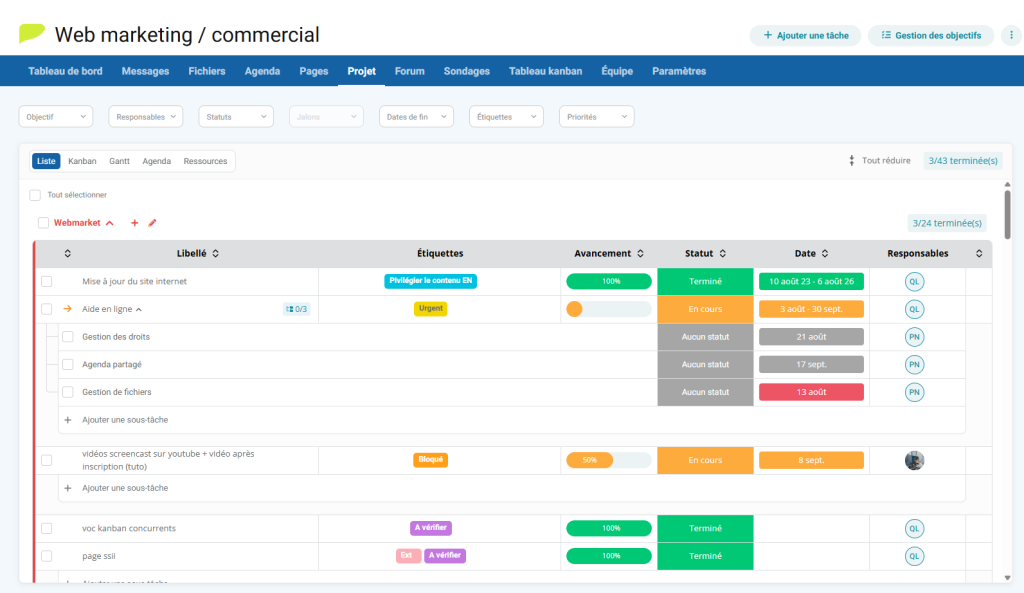
Subtasks are now available in Acollab's project management tool
With this new feature, Acollab’s project management tool now allows you to create subtasks directly from a main task.
The goal is to provide more precise project management without making the tool unnecessarily complicated. Teams can organize their assignments according to their own working methods and adjust the level of detail to suit each project.
A straightforward project can still be organized around a few main tasks.
A more complex project, on the other hand, can be broken down into several levels of actions to make progress easier to track. This new feature is fully integrated into Acollab’s Project Management module.
Better visibility into the work that needs to be done
One of the main benefits of subtasks is improved visibility.
A general task can make it seem as though a project is nearly complete, even when several actions still need to be carried out. With subtasks, project managers can see the different steps required in much greater detail.
This makes it easier to answer several key questions:
- What has already been completed?
- What still needs to be done?
- Who needs to get involved?
- What are the next steps?
This more detailed overview makes project monitoring easier and helps teams identify potential bottlenecks more quickly.
Better distribution of responsibilities across the team
Projects rarely involve just one person. Several team members may contribute to the same assignment, each with different responsibilities.
Subtasks make it easier to break down the work and distribute individual actions across the team.
This approach also reduces ambiguity: everyone can more easily understand their role and how their contribution fits into the overall project.
A useful feature for complex projects
Not every team has the same project management needs. For some projects, a simple task list is enough.
For others, the level of complexity means that each step needs to be clearly defined.
Subtasks are particularly useful for projects that:
- Involve several team members
- Include many different steps
- Require several rounds of approval
- Depend on actions being completed in a specific sequence
- Involve several departments
- Have different deadlines
- Require regular progress tracking
The project remains organized around a set of main tasks, while providing the level of detail needed to monitor the actions involved. This improves both visibility and project tracking.

Subtasks and project management: less mental load
Good project organization is not just about keeping track of deadlines. It also helps reduce the mental load of having to remember every action that needs to be completed.
When a complex assignment exists only in one team member’s head, some of the information still depends entirely on that person.
By breaking the work down into subtasks, each step becomes more visible and is shared with the rest of the team. Team members no longer have to keep asking themselves: “What do I need to do next?”
The next actions are clearly identified within the project itself.
A new feature that complements Acollab's project management tool
Subtasks add to the features already available in Acollab’s project management module.
Teams can already rely on different views to organize and track their projects, including List, Kanban, Gantt and Resources.
Each view serves a different purpose:
- The List view provides a structured overview of tasks.
- The Kanban view makes it easier to track the different stages of a project.
- The Gantt chart helps visualize project scheduling.
- The Calendar view offers a more calendar-oriented approach to planning.
- The Resources view makes it easy to spot workload peaks or identify when team members have available capacity.
Already using Acollab? Try out subtasks in your project management workspace today.
And if you’re new to Acollab, this could be the perfect opportunity to discover a collaborative platform designed to bring your projects, documents, calendars and team discussions together in one place.