
The best shared calendars in 2026 :
choosing the right solution
Time management is a daily challenge for modern teams. Between meetings, collaborative projects, travel, and unexpected events, having a reliable, intuitive, and secure shared calendar tool has become essential. In 2026, many solutions are available to businesses, but how do you choose the one that best fits your needs? This article provides an overview of the best shared calendar tools.
Why use a shared calendar ?
A shared calendar allows you to:
- Centralize schedules: all information is gathered in one place, making coordination easier.
- Improve communication: team members can see each other’s availability, reducing scheduling conflicts.
- Increase efficiency: planning becomes faster and smoother, with fewer back-and-forth emails or messages.
- Facilitate remote work: accessible from anywhere, shared calendars enable geographically distributed teams to collaborate effectively.

Key criteria for choosing a shared calendar
Before selecting a tool, it’s important to define your needs:
- Accessibility: the tool should be available across multiple devices (computer, smartphone, tablet).
- Ease of use: a clear and intuitive interface is essential for quick team adoption.
- Collaborative features: the ability to share calendars, schedule meetings, and sync with other tools is a major advantage.
- Security: data must be protected, especially when working remotely or handling sensitive information.
The best shared calendar tools in 2026
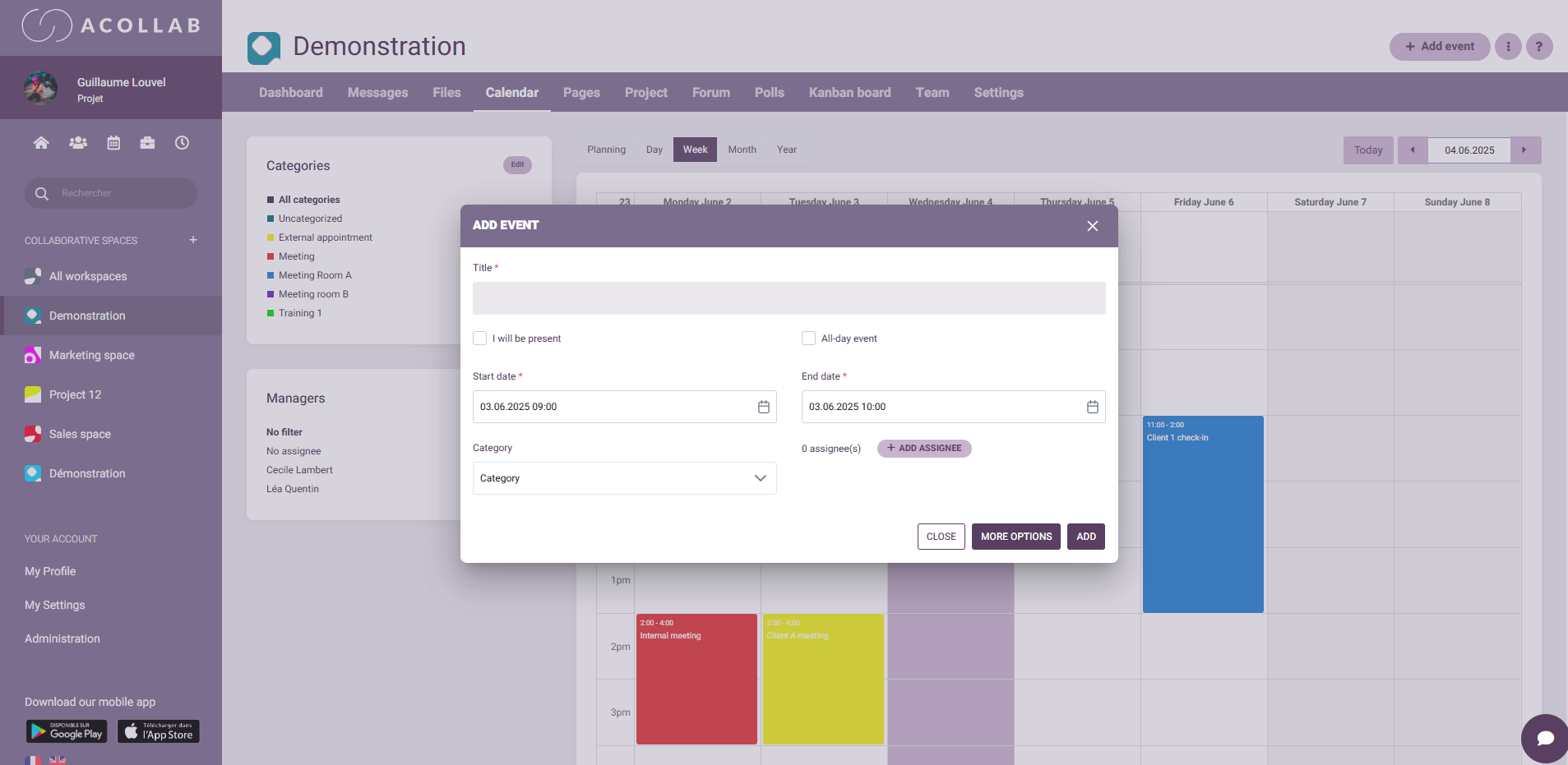
Acollab is a French collaborative platform that offers a shared calendar integrated with project management, file sharing, and messaging tools. It is particularly well suited for small and medium-sized businesses as well as public organizations.
Key features:
- Team schedule visualization and calendar sharing based on access rights
- Calendar management: event creation, confidential events, reminders, availability and absence tracking
Acollab also includes additional integrated modules:
- Project management: task creation, progress tracking, responsibility assignment
- Document sharing: centralized files, version control, controlled access
- Integrated messaging: seamless team communication
- Accessibility: available via web and mobile app
Advantages:
- Data hosting in France
- Highly intuitive interface: quick onboarding, even for non-technical users
Use case example:
A local authority can use Acollab to coordinate schedules across departments or associations booking a city gymnasium, manage cross-functional projects, and centralize administrative documents.
Google Calendar remains a benchmark for shared calendars. It is especially suited for teams already using Google Workspace tools.
Key features:
- Event creation: meeting scheduling, reminders
- Calendar sharing with colleagues or groups
- Integration with Google Meet: automatic video call links
- Synchronization across any internet-connected device
Advantages:
- Free: included in Google Workspace, with a free version available
- Broad ecosystem: integrates seamlessly with Gmail, Google Drive, Google Meet, etc.
- Ease of use: simple and clean interface
Limitations:
- Limited advanced features compared to specialized solutions
- Restricted customization options

For companies using Microsoft 365, Outlook Calendar is a robust shared calendar solution well integrated into the Microsoft ecosystem.
Key features:
- Calendar management: event creation, availability tracking
- Calendar sharing with colleagues or groups
- Integration with Teams: automatic meeting links
- Side-by-side view of multiple calendars
Advantages:
- Native integration with Outlook, Teams, OneDrive, etc.
- Strong security backed by Microsoft 365 protocols
- Advanced customization options
Limitations:
- Learning curve for new users
- Dependency on the Microsoft ecosystem

Doodle stands out for its ability to simplify scheduling meetings with multiple participants.
Key features:
- Poll creation: propose time slots and select the best option for everyone
- Integration with calendars like Google Calendar and Outlook
- Automatic notifications and reminders
Advantages:
- Simplicity: quick poll creation without prior registration
- Time-saving: simplifies coordination among multiple participants
- Free basic version
Limitations:
- Advanced features require a subscription
- Not a full calendar tool—focused only on meeting scheduling

Calendly is designed for scheduling appointments, ideal for professionals looking to streamline their calendar management.
Key features:
- Availability slots: define time windows for appointments
- Calendar synchronization with Google Calendar, Outlook, etc.
- Customization: add questions to booking forms
Advantages:
- Time-saving: eliminates back-and-forth communication
- Professional interface for clients
- Automation: automatic confirmations and reminders
Limitations:
- Limited scope: focused only on appointment scheduling
- Restricted free version
For organizations with highly specific needs, Akelio offers the development of custom shared calendars. These solutions are designed to perfectly match internal processes, workflows, and team-specific constraints.
Whether managing complex projects, coordinating multi-site teams, or integrating department-specific calendars, Akelio builds flexible and user-friendly tools. Custom shared calendars provide full visibility of availability, automate coordination between team members, and simplify priority management while ensuring data security and confidentiality.
Thanks to their expertise, Akelio teams support companies from design to deployment, ensuring fast and effective adoption by all users.
Concrete example:
The Intergénération45 association worked with Akelio to create a custom schedule to manage member assignments across partner companies. Thanks to this shared calendar, mission coordination is simplified and team availability is visible in real time.

How to choose the right tool for your organization ?
he choice depends on several factors:
- Team size: some solutions are better suited for large enterprises, others for smaller organizations
- Existing ecosystem: if you already use tools like Google Workspace or Microsoft 365, choosing a compatible calendar is a smart move
- Specific needs: if you require advanced features like project management, document sharing, or integrated messaging, solutions like Acollab may be more appropriate
Conclusion
In 2026, many shared calendar solutions are available, each with its strengths and limitations. Acollab stands out with its integrated approach, tailored to SMEs and public organizations, and its data hosting in France. Depending on your specific needs, comparing several tools is the best way to choose the one that fits your organization.